Visual brief
Enhancing User Experience with Custom ERP Dashboards
At TheCodeWork®, we’re focused on creating custom ERP dashboards empowers you to make smarter decisions that align with your business goals.
- Why Choose Custom ERP Dashboards? As mentioned earlier, traditional dashboards often confuse users with irrelevant or excessive data, which decreases the overall effectiveness.
- Tailored Data Visualization Customizable dashboards provide unparalleled flexibility to meet the specific needs of different users:
- Real-Time Insights It also ensures that your team always have the most current and accurate data available:
- Why Choose TheCodeWork®? At TheCodeWork®, we specialize in creating intelligent, user-focused ERP dashboards designed to drive businesses across industries.
In full
It goes without saying that the way businesses interact with data is continuously evolving. Besides, traditional ERP dashboards can overwhelm users with irrelevant information, making it harder to focus on what really matters. Thus, custom ERP dashboards transform that by tailoring data views to individual needs.
Similarly, at TheCodeWork®, we’re focused on creating ERP dashboards that do more than just display data! Moreover, it empowers your teams to make smarter decisions, streamline workflows, and align with your business goals. Our solutions help organizations work smarter, not harder, by delivering the right information at the right time and in a way that’s easy to understand and act upon.
Let’s see how!
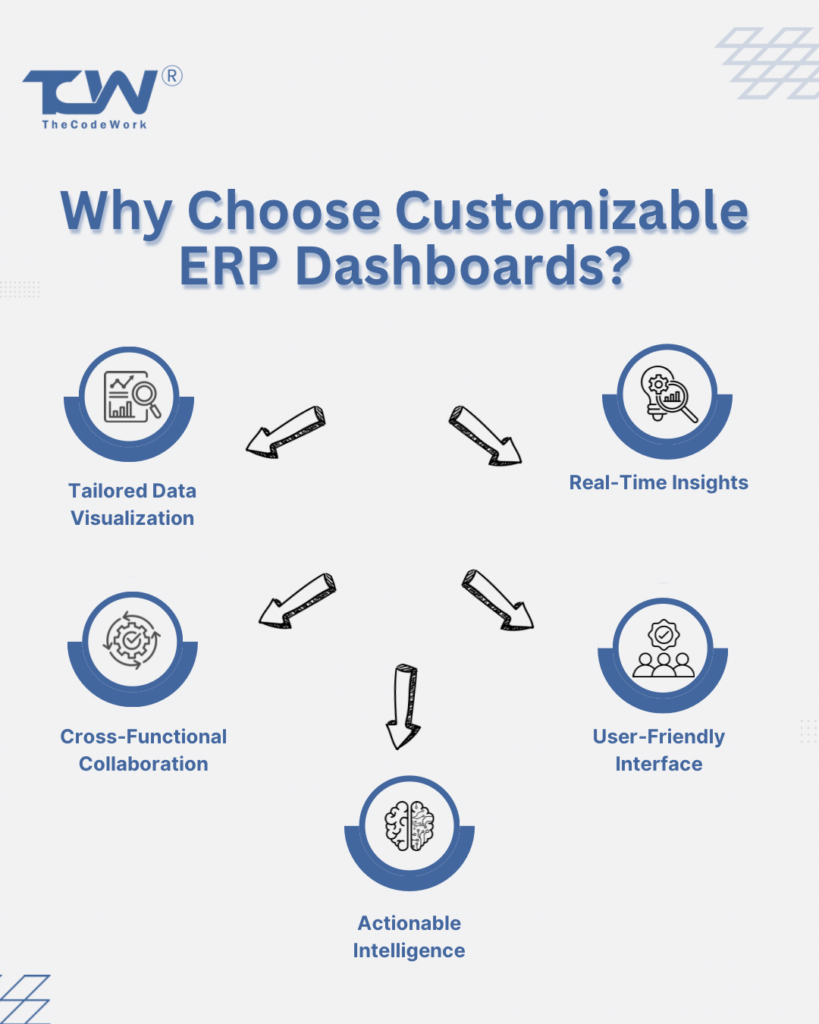
Why Choose Custom ERP Dashboards?
As mentioned earlier, traditional dashboards often confuse users with irrelevant or excessive data, which decreases the overall effectiveness. In contrast, customizable ERP dashboards focus on what truly matters, delivering clarity and actionable insights.
Meanwhile, 90% of decision-makers believe that customized dashboards allow them to make faster and more accurate decisions.
Now, here are the following key features make TheCodeWork®’s solutions an ideal choice for modern businesses:
1. Tailored Data Visualization
Customizable dashboards provide unparalleled flexibility to meet the specific needs of different users:
- Interactive Widgets: Allow users to personalize their dashboard by adding, removing, or rearranging components.
- Multi-Level Filters: Facilitates deep data analysis by allowing users to drill down into categories and uncover granular insights.
- Role-Based Views: Also, allow team members to focus exclusively on data relevant to their specific functions, whether in HR, or other operations.
Talking of which, check out our HRMS solution (CrewForge) here.
2. Real-Time Insights
It also ensures that your team always have the most current and accurate data available:
- Live Data Feeds: Empower decision-making with real-time data updates.
- Dynamic Updates: The metrics automatically refresh as new data is received, eliminating the need for manual reporting.
- Custom Alerts: Set personalized thresholds for key metrics and receive instant notifications when those thresholds are exceeded.
Also, companies using real-time alert systems report that 72% of critical issues are addressed before they escalate.
Explore: How Real-Time Data on ERP Dashboards Drives Agility?
3. Cross-Functional Collaboration
Additionally, it promote alignment and collaboration across departments with a unified view of critical data:
- Shared Views: Increases transparency by allowing multiple teams to access and work with the same data.
- Collaborative Features: Facilitates teamwork by adding notes or flagging data points for follow-up with colleagues.
- Integrated Workflows: Synchronizes dashboards with essential tools such as project management software or CRM systems to create a cohesive workflow.
Beside, Salesforce reports that 63% of businesses with integrated CRM workflows see better internal communication and team coordination.
Furthermore, you can also learn: How AI in CRM enhances customer engagement!
4. User-Friendly Interface
Ensures seamless adoption across your organization with an intuitive and easy-to-use interface:
- Drag-and-Drop Customization: Make it easy for users to rearrange and personalize dashboard components.
- Responsive Design: Access dashboards across all devices, from desktop to tablet to mobile, ensuring continuity in a mobile-first world.
- Visual Cues: Highlight key trends or anomalies using color-coded indicators and charts for quicker interpretation of complex data.
5. Actionable Intelligence
Finally, it transforms raw data into strategic decisions through advanced analytics and insights:
- Predictive Analytics: Leverages AI to forecast trends and suggest actionable next steps.
- Scenario Planning: Simulate the impact of potential decisions before executing them to better inform strategies.
- Automated Recommendations: Receive data-driven suggestions tailored to your business objectives based on emerging patterns and trends.
Likewise, companies leveraging (AI) and predictive analytics are 5 times more likely to outperform their competitors!
So, here’s a guide to learn how to use AI analytics for business?
Why Choose TheCodeWork®?
At TheCodeWork®, we specialize in creating intelligent, user-focused ERP dashboards designed to drive businesses across industries. So, whether your goal is to:
- Enhance operational efficiency
- Improve cross-departmental collaboration
- Or leverage real-time insights for smarter decision-making

We are dedicated to helping you achieve your objectives – Book a Free Demo Today!